
Managed Patch ManagementStay ahead of cyber threats with our automated OS & software patch management solutions

Eliminate vulnerabilities before they become a problem
with our advanced managed patch management services
Our managed patch management services proactively identify and resolve vulnerabilities in your software before they can be exploited by cyber criminals. This helps to prevent security breaches and protect your valuable data.
OS Patching
Patch all your operating systems and keep your endpoints protected.

Third-Party Patching
Install, uninstall and patch all your third party applications on schedule or on-demand.
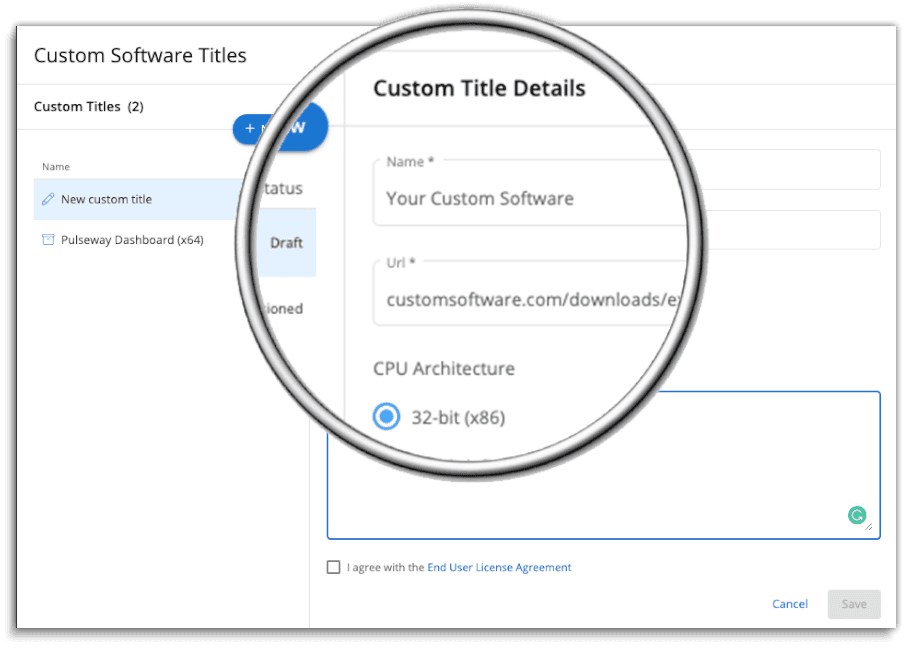
Custom Software Titles
Deploy custom titles needed for your business continuity.

Automated Patching
Automate your OS and third-party patching by creating policies and schedules.
Although most news reports about cybersecurity focus on zero-day and emerging threats, unpatched vulnerabilities result in far more cyber attacks. In many cases, patches for exploited vulnerabilities have existed for months, sometimes years.
Fully Managed Patch Management Service
Our fully managed patch management solution offers:
- Proactive Identification and Application: Proactively identify and apply patches and updates to software.
- Testing and Monitoring: Testing and monitoring to ensure patches do not cause compatibility issues.
- Protection Against Vulnerabilities: Protection against known vulnerabilities and exploits.
- Compliance Adherence: Compliance and regulatory standards adherence.
- Peace of Mind: Peace of mind and the ability to focus on growing your business.
With our fully managed solution, you can ensure that your software is secure, up-to-date, and compliant, so you can focus on growing your business. Our team of experts will take care of the technical details of patch management, leaving you to focus on other important aspects of your business.

Major Benefits of Proactive Patch Management

ENHANCE SECURITY
Failed or missed patches cause irreparable damage to systems. Well-thought patch management strategy can take your security up a notch across Windows devices, and prevent them from significant disruptions and downtime.
MINIMIZE DOWNTIME
Organizations often experience disruptions due to poor patch management. System failures and bad timing for reboots can cost you a fortune. Applying available patches in timely manner can avoid functional bugs, critical issues, and evade financial losses.

MANAGED COMPLIANCE
Cybersecurity threats will always be on the rise, that’s why it’s mandatory to keep your systems updated. Noncompliance leads to penalties and reputational issues losses, so you need a solid patch management plan to avoid cybersecurity issues and comply with the industry requirements.
FEATURE UPDATES
Not only do patches fix error and vulnerabilities. They can also uncover new functions and features to help your organization maintain systems up-to-date and keep pace with the latest tech updates.
Stop wasting time and money on technology. Let’s Get Started!Contact us to learn how we can better protect your business network
Closing the risk window
Our solution helps better protect your businesses through a process that continuously identifies, manages and mitigates risk.
We keep a your network secure 24/7 insuring that your operating systems and software always have the latest security patches and fixes installed.
IT systems are monitored in real-time and operating system & software patches are installed for you as they become available. Immediately fixing security vulnerabilities and software bugs greatly limits your vulnerability exposure to online threats and hackers.
With Managed IT Professionals as your outsourced IT partner,
you will experience:

Supported ApplicationsOur 3rd party patch management services proactively identify and resolve vulnerabilities in your software before they can be exploited by cyber criminals. This helps to prevent security breaches and protect your valuable data.
 .NET Core ASP Runtime .NET Core ASP Runtime 5.0
 .NET Core Runtime .NET Core SDK .NET Desktop Runtime 5.0
 .NET SDK 5.0
 3CX Phone
 7-zip
7-zip 8×8
8×8 Adobe Acrobat Pro
 Adobe Acrobat Reader DC
 Adobe Flash Player AX Adobe Flash Player NPAPI Adobe Flash Player PPAPI
 AdoptOpenJDK11 AdoptOpenJDK8 AdoptOpenJRE11 AdoptOpenJRE8
 Amazon CLI
 Amazon Corretto 11 Amazon Corretto 8
 Amazon Workspace
 Anydesk
 Apache Tomcat
 Atom
Atom AutoHotkey
 Autoruns
 AWS CLI v2
 Azure CLI
 Box Drive
 Caffeine
 Calibre
 CCleaner
 Cisco Webex Meetings
 Cisco Webex Teams
 Citrix Receiver
 Citrix Workspace 19
 Cloud App
 Cmder
Cmder cURL
cURL CutePDF Writer
 Cyberduck
 Database.NET
 DBeaver
 Disk Usage
 Docker Desktop
 Draw.io
 Dropbox
 Evernote
 Everything
 FileZilla
 Firefox ESR
 Forti Client VPN
 Foxit Reader
 FrontApp
 GIMP
GIMP Git
Git Google Backup and Sync
 Google Chrome
 Google Drive File Stream
 GoToMeeting
 Grafana
 Greenshot
 HxD
HxD ImageMagick
 Inkscape
 iTunes for Windows
 Jabra Direct
 Java SE Runtime Environment 7 Java SE Runtime Environment 8 Java(TM) SE Development Kit 11 Java(TM) SE Development Kit 8
 Keepass
 LastPass
 LibreOffice
 LogMeIn Client
 Malwarebytes 3 Malwarebytes 4
 Microsoft .Net Framework 3.5 Microsoft .Net Framework 4.8
 Microsoft Edge
 Microsoft Office 2019 Professional Plus
 Microsoft Office 2019 Professional Plus Access
 Microsoft Office 2019 Professional Plus Excel
 Microsoft Office 2019 Professional Plus OneNote
 Microsoft Office 2019 Professional Plus Outlook
 Microsoft Office 2019 Professional Plus Powerpoint
 Microsoft Office 2019 Professional Plus Publisher
 Microsoft Office 2019 Professional Plus Word Microsoft Office 365 Business Microsoft Office 365 Business Access Microsoft Office 365 Business Excel Microsoft Office 365 Business OneNote Microsoft Office 365 Business Outlook Microsoft Office 365 Business Powerpoint Microsoft Office 365 Business Publisher Microsoft Office 365 Business Word
 Microsoft Office 365 Proplus
 Microsoft Office 365 ProPlus Access
 Microsoft Office 365 ProPlus Excel
 Microsoft Office 365 ProPlus Onenote
 Microsoft Office 365 ProPlus Outlook
 Microsoft Office 365 ProPlus Powerpoint
 Microsoft Office 365 ProPlus Publisher
 Microsoft Office 365 ProPlus Word
 Microsoft OneDrive
 Microsoft Teams
 Microsoft Visual C++ Redistributable 14
 Mozilla Firefox
 Mozilla Thunderbird
 mRemoteNG
 Nessus Agent
 Nginx
Nginx Nitro
Nitro NodeJS
 Notepad++
 Nuget
Nuget nxlog community edition
 Octopus Deploy
 OpenOffice
 OpenVPN OpenVPN Connect
 Opera
Opera OwnCloud Client
 parallels client
 PDFCreator
 Peazip
 Pritunl
 Process Hacker
 Process Monitor
 Pulseway Remote Control
 Pulumi
 Putty
Putty Python2 Python3
 QuickTime for Windows
 Real VNC Viewer
 Remote Desktop Manager
 Ruby
Ruby Rufus
Rufus Rust
Rust Screenpresso
 ShareX
 Shortcut
 Skype
Skype Skype for Business
 Slack
Slack SmartFTP
 SonicWall NetExtender
 Sourcetree
 Splashtop Business Access
 Splashtop Streamer
 SQL Server Management Studio 18
 Stripe CLI
 Swiss File Knife
 Tabby
Tabby TeamViewer 13 TeamViewer 14 TeamViewer 15
 Telegram Portable
 Termius Portable
 Terraform
 TightVNC
 TortoiseGit
 TreeSize
 VirtualBox
 Visual Studio Code
 VLC Media Player
 VMware Horizon Client
 VMware Tools
 VMware Workstation Player VMware Workstation Pro
 WeChat
 WinDirStat
 Windows Terminal
 WinMerge
 WinRar
 WinSCP
 WinZip
 Zoom
ZoomDon't see the application you need? Don't worry, we support custom 3rd party applications.
Additional Benefits of Proactive Patch Management
Proactive Protection
An effective patch management process can close vulnerabilities before they are exploited
Zero-day Deployment Services
Stop vulnerabilities immediately
Best of Breed
Industry-leading management tools disseminate patch delivery to endpoints and more
Flexible Schedule
Customized timely deployment schedule dramatically reduces corporate risk
Focus Resources
Removes the burden of resource-intensive IT activities
24 x 7 x 365 Response
Our service offers protection around the clock
Worried about falling victim to a ransomware attack?Stay ahead of cyber threats with our 3rd party software patch management solutions

Worrying about falling victim to a ransomware attack is a valid concern as it can cause significant damage to your business. By implementing a robust patch management solution, you can reduce the risk of falling victim to a ransomware attack by keeping your software up-to-date and protected against known vulnerabilities.
Furthermore, our managed cybersecurity services also include advanced ransomware protection to help prevent, detect, and respond to ransomware attacks. We utilize a multi-layered approach to cybersecurity with a combination of endpoint security, network security, DNS encryption, and managed detection and response protocols to detect and stop ransomware before it can cause damage.
Patch Management - Frequently Asked Questions
We often receive questions about our Proactive Patch Management services, so we thought we would clear them up with some helpful FAQs below. Of course, you can also pick the phone up and speak with us as we would be more than happy to help.

Patch management is the process of identifying, testing, and installing software updates or patches on a regular basis to fix known vulnerabilities and improve the overall security and functionality of a system. It is an essential part of any cyber security strategy, as software vulnerabilities can be exploited by cyber criminals to gain unauthorized access to a system or steal sensitive information.
Patch management can be applied to both third-party software and custom-built software. Third-party software refers to software that is developed by a company other than the one using it, such as Microsoft Windows or Adobe software, while custom-built software refers to software that is created in-house.
- Identify vulnerabilities in software
- Test and install updates or patches
- Improve security and functionality of system
- Keep software up-to-date
- Reduce the risk of a security breach
Patch management for third-party software is particularly important because the software vendor will release updates to fix vulnerabilities and improve functionality. This is crucial for organizations that rely on third-party software, as they need to ensure that their software is up-to-date to protect against known vulnerabilities and exploits.
By working with a Managed IT Professionals, which offers patch management services, organizations can ensure that their software is properly updated and secured, reducing the risk of a security breach and protecting their valuable data.
Patch management is an important aspect of an overall cyber security strategy because it helps to protect against known vulnerabilities and exploits in software. As cyber threats continue to evolve, software vendors will release updates to fix any vulnerabilities that have been discovered in their products. These updates, or patches, are critical to keeping software and systems secure.
Without proper patch management, vulnerabilities in software can go unaddressed, leaving systems open to potential attacks. This can lead to security breaches and the loss of sensitive data, which can be costly for businesses and individuals.
Additionally, many organizations are required by regulatory standards and laws to maintain a certain level of security, which may include keeping software up-to-date. Failure to comply with these regulations can result in hefty fines and penalties.
Moreover, patch management can also improve the functionality and performance of the software. By fixing bugs and glitches, software will run more efficiently and be less prone to crashes.
Here are some key points to consider:
- Protect against known vulnerabilities and exploits in software
- Keep software and systems secure
- Prevent security breaches and loss of sensitive data
- Meet regulatory standards and laws
- Improve functionality and performance of software
By implementing patch management and staying vigilant about updates, organizations can better protect their systems, data, and reputation from cyber threats.
Patching is an essential part of any cyber security strategy as software vulnerabilities can be exploited by cyber criminals to gain unauthorized access to a system or steal sensitive information.
Without proper patching, vulnerabilities in software can go unaddressed, leaving systems open to potential attacks. This can lead to security breaches, data loss, and potential damage to an organization’s reputation.
Additionally, many organizations are required by regulatory standards and laws to maintain a certain level of security, which may include keeping software up-to-date. Failure to comply with these regulations can result in hefty fines and penalties.
Moreover, patching can also improve the functionality and performance of the software. By fixing bugs and glitches, software will run more efficiently and be less prone to crashes.
Here are some key points to consider:
- Fix known vulnerabilities and improve security
- Prevent security breaches and loss of sensitive data
- Meet regulatory standards and laws
- Improve functionality and performance of software
- Keep software and systems up-to-date
By patching software and systems regularly, organizations can better protect their systems, data, and reputation from cyber threats, and ensure the continuity of their business operations.
Effective patch management is essential for ensuring the security and reliability of software and systems. There are several steps that organizations can take to ensure their patch management is effective:
- Identify all software and systems that need to be patched: Make sure to have a comprehensive inventory of all software and systems that need to be patched, including third-party and custom-built software.
- Prioritize patches based on risk: Not all patches are created equal, some are more critical than others. Prioritize patches based on the level of risk they address, and apply the most critical patches first.
- Test patches before deploying: Before deploying a patch, test it in a non-production environment to ensure it doesn’t cause any compatibility issues or other problems.
- Develop a patch management schedule: Establish a schedule for patch management, including when to check for new patches, when to test and deploy patches, and how often to check for new patches.
- Monitor your systems: Keep an eye on your systems for any unusual activity or performance degradation, and investigate any issues that arise.
- Get help from a Managed Service Provider (MSP) if needed: Managed Service Providers (MSPs) can provide expert guidance and resources to help ensure effective patch management.
Here are some key points to consider:
- Identify all software and systems that need to be patched
- Prioritize patches based on risk
- Test patches before deploying
- Develop a patch management schedule
- Monitor your systems
- Get help from a Managed Service Provider (MSP) if needed
By following these steps and staying vigilant about updates, organizations can better protect their systems, data, and reputation from cyber threats and ensure the continuity of their business operations.
Managed patch management typically covers more than just Windows patches. It also includes updates for third-party software as well as custom-built software titles. It is important to keep all software up-to-date, including both third-party and custom-built software, to ensure the best possible security and performance of the systems.
Third-party software refers to software that is developed by a company other than the one using it, such as Microsoft Windows or Adobe software, while custom-built software refers to software that is created in-house. It is important to keep both types of software up-to-date to protect against known vulnerabilities and exploits.
When it comes to third-party software, Managed IT Professionals can work with software vendors to ensure that the software is properly updated and secured. For custom-built software, the organization should ensure that updates are developed and deployed as needed.
Here are some key points to consider:
- Managed patch management typically covers more than just Windows patches
- It also includes updates for third-party software as well as custom-built software titles
- It’s important to keep all software up-to-date, including both third-party and custom-built software
- MSPs can work with software vendors to ensure that third-party software is properly updated and secured
- Organizations should ensure that updates are developed and deployed for custom-built software as needed.
By working with Managed IT Professionals patch management services, organizations can ensure that all their software is properly updated and secured, reducing the risk of a security breach and protecting their valuable data.
Patch management for third-party software is particularly important because it ensures that the software is up-to-date and protected against known vulnerabilities and exploits. Third-party software refers to software that is developed by a company other than the one using it, such as Microsoft Windows or Adobe software.
Third-party software is widely used in organizations, and it is essential to ensure that it is properly secured. This is particularly important in the case of software that is critical to the organization’s operations, such as operating systems, databases, and productivity tools.
Moreover, many organizations are required by regulatory standards and laws to maintain a certain level of security, which may include keeping software up-to-date. Failure to comply with these regulations can result in hefty fines and penalties.
Here are some key points to consider:
- Ensure that third-party software is up-to-date and protected against known vulnerabilities and exploits
- Third-party software is widely used in organizations, and it is essential to ensure that it is properly secured
- Especially important in the case of software that is critical to the organization’s operations
- Meet regulatory standards and laws
- Prevent security breaches and loss of sensitive data
By working with Managed IT Professionals patch management services, organizations can ensure that their third-party software is properly updated and secured, reducing the risk of a security breach and protecting their valuable data.
Not deploying patch management can have significant consequences for organizations. Here are a few examples:
- Security breaches: Without proper patch management, vulnerabilities in software can go unaddressed, leaving systems open to potential attacks. This can lead to security breaches, data loss, and potential damage to an organization’s reputation.
- Compliance issues: Many organizations are required by regulatory standards and laws to maintain a certain level of security, which may include keeping software up-to-date. Failure to comply with these regulations can result in hefty fines and penalties.
- Loss of productivity: When software is not up-to-date, it may become unstable and prone to crashes, leading to loss of productivity and wasted time resolving issues.
- Reputation damage: Security breaches, data loss, and compliance issues can all damage an organization’s reputation, leading to loss of customers and revenue.
- Financial losses: Security breaches can be costly, with organizations potentially facing large fines, legal fees, and costs associated with restoring systems and recovering lost data.
Here are some key points to consider:
- Security breaches
- Compliance issues
- Loss of productivity
- Reputation damage
- Financial losses
By deploying patch management and staying vigilant about updates, organizations can better protect their systems, data, and reputation from cyber threats, and ensure the continuity of their business operations.
Didn't find your answer?We are always here to help!

[custom-related-posts title=”Related Articles” none_text=”None found” order_by=”title” order=”ASC”]
Recent News
-

9 Email Safety Tips You Need to Know
Follow these tips for email safety to keep yourself and your devices safe from malware that can come from ill-intentioned emails.
March 8, 2023 -
Why Should You Use a Local Managed Service Provider?
Learn the benefits of using a local managed service provider (MSP) for IT services, including the advantages of in-person support, quick response times, better communication, and more. Also learn how MSPs can provide tailored solutions to meet the unique needs of businesses.
February 24, 2023 -
Sick of Your Slow Computer? 8 Common Issues and Their Solutions for Better Productivity
Discover expert-recommended solutions for fixing a slow computer and maximizing employee productivity. Discover how to optimize your computer’s performance for optimal efficiency and increased productivity levels.
February 7, 2023 -
Benefits of Automated Patch Management As Part Of Managed IT Services for Small Business
Cyber attacks and data breaches damage productivity, revenue, and reputation. Consider patch management and managed IT services to avoid security issues.
For an increasing number of companies, IT processes compose the infrastructure of their business. This IT framework allows for streamlining day to day operations, maximizing productivity, cutting costs, and ultimately increasing profits.January 17, 2023


